Ultrakoki App Alternative for Dual Weight
If you use an Ultrakoki scale and want its dual-weight data to become a useful brew history, Brew Better is an alternative on iOS and Android built for recording and reviewing pour-over coffee. It follows both the water going into the brewer and the coffee collected below, then keeps those curves with your recipe, coffee, and tasting notes.
Brew Better is not a replacement for every Ultrakoki utility. Keep the Ultrakoki app for firmware updates, scale configuration, and brand-specific modes. Use Brew Better when you want a clear daily workflow for brewing, analysis, and comparison.
Why Dual-Weight Data Matters
A single-sensor scale can show how much water you poured. Ultrakoki’s separate weight channels can also show how much coffee has reached the server. Brew Better turns those readings into water-in, coffee-out, pour-rate, and drip-rate curves.
With a supported Ultrakoki scale, Brew Better can:
- Display live water and beverage weight during the brew.
- Plot pour rate and drip rate instead of treating the brew as one weight line.
- Record the scale’s timer and temperature data when reported.
- Finish the brew when the scale sends its brewing-complete signal.
- Save the coffee, recipe, grind setting, water temperature, ratio, and notes with the curves.
- Analyze pour phases and compare the result with earlier brews.
This is most useful when you want to see not only how you poured, but also how quickly the brewed coffee moved through the bed.
Save the Record and Inspect Each Pour
Save your Ultrakoki brew as a recipe with its recorded session, coffee, grind setting, temperature, and tasting notes. Expand Pouring Structure to review detected phases beside the curves. With suitable dual-weight data, check water-in and pour rate alongside coffee-out and drip rate, including what happens during pauses between pours.
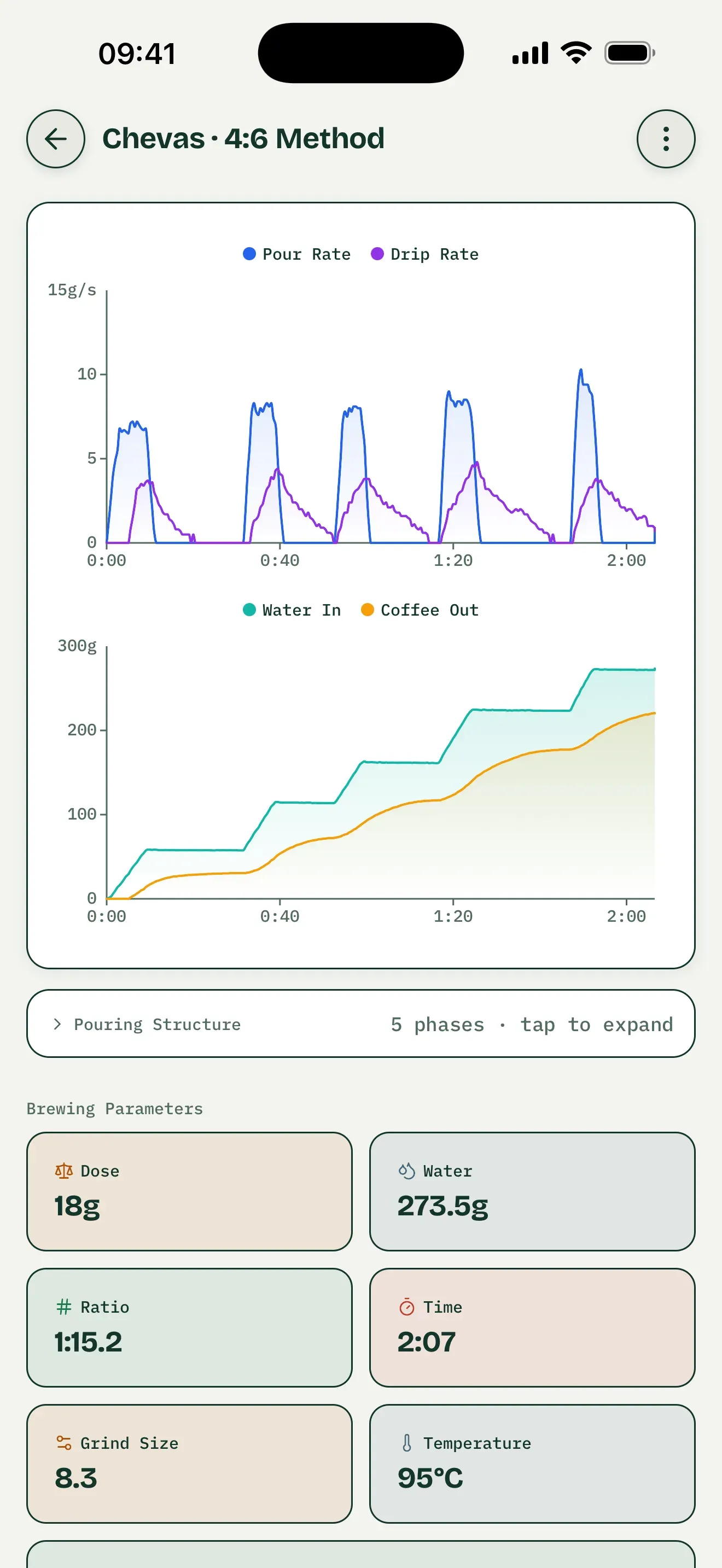
General saved-record interface, not an Ultrakoki model test. Dual-weight metrics depend on the connected scale’s available data.
Compare Brews One Variable at a Time
Select two saved brews and choose a baseline. Try changing only grind setting while keeping coffee, dose, water, and pouring plan unchanged. Overlay the available curves and compare phase timing and water amounts. Keep tasting notes with each record; differences in coffee-out or drip rate do not by themselves establish what caused a taste result.
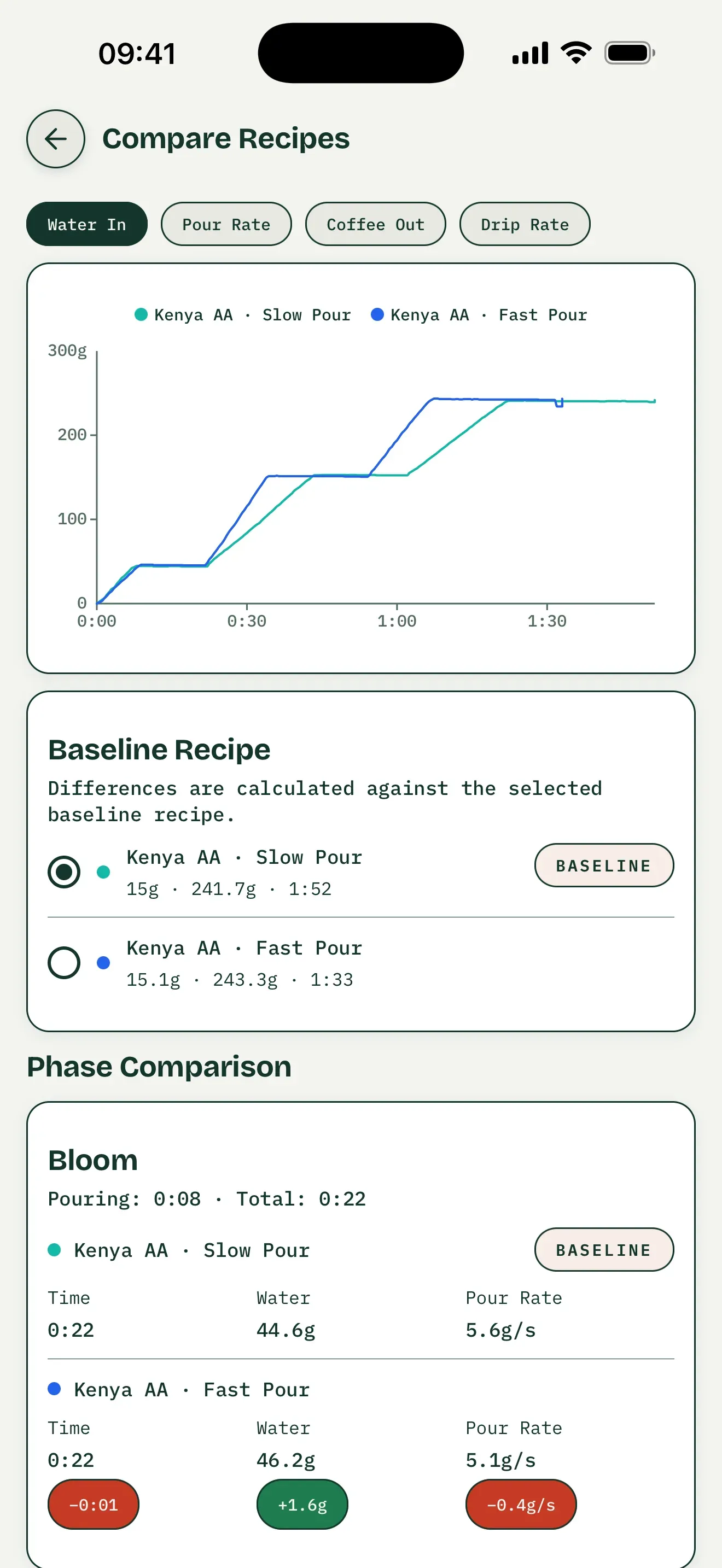
General comparison interface, not an Ultrakoki test; coffee-out and drip-rate comparisons require suitable dual-weight recordings.
Practice a Saved Brew, or Follow a Preset
Open a saved recipe containing a recorded session, choose Recreate this brew to practice, and connect your supported Ultrakoki scale. The saved recorded curve becomes the target overlaid with your live curve. Use physical scale controls for tare and timing. Following a preset is separate: its planned steps and targets guide you, rather than recreating your recording.
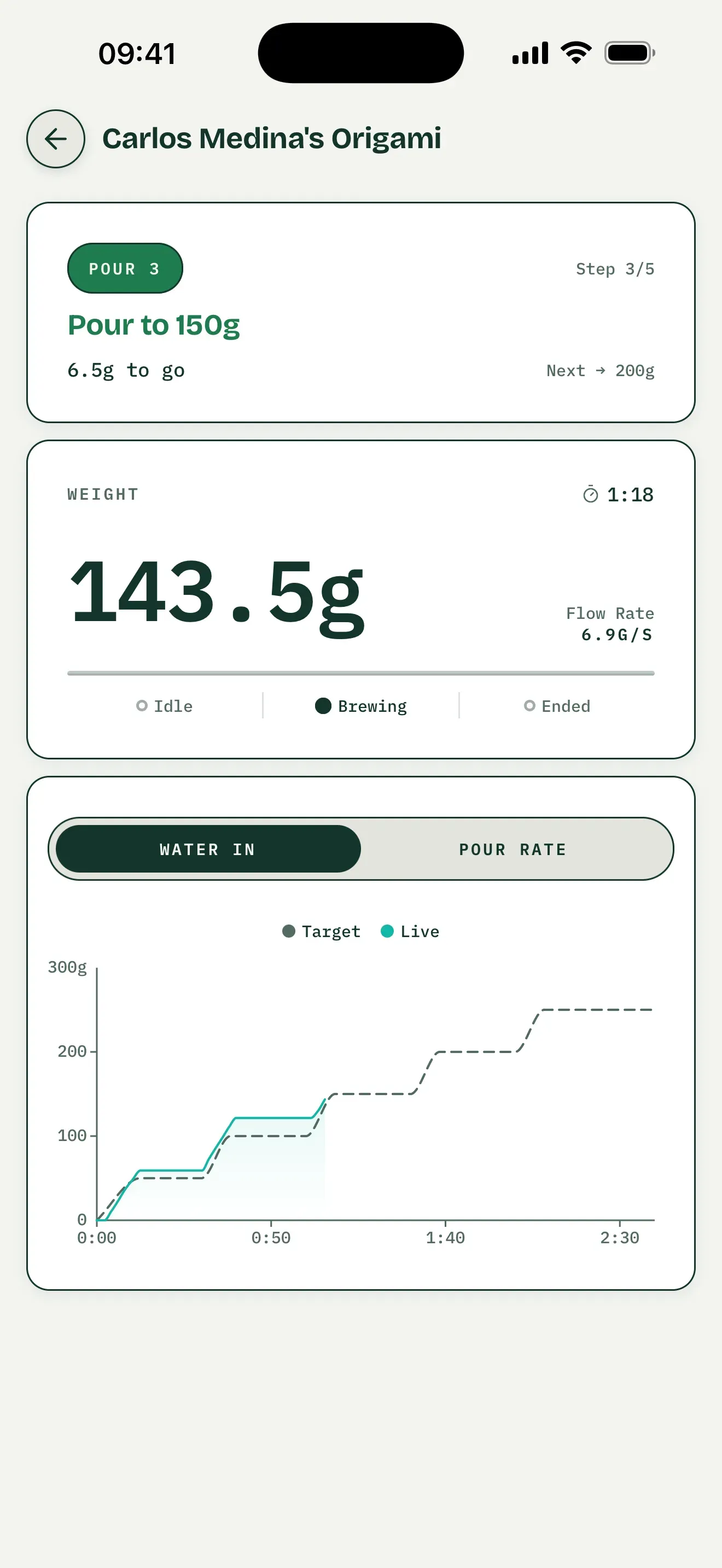
Preset-guidance interface example, not saved-brew practice or an Ultrakoki model test.
Brew Better and the Ultrakoki App Serve Different Jobs
| What you need | Brew Better | Ultrakoki tools |
|---|---|---|
| Live dual-weight brew curves | Yes | See the current Ultrakoki app |
| Pour-rate and drip-rate review | Yes | See the current Ultrakoki app |
| Detailed records and brew comparison | Yes | Available workflows are described in the app guide |
| Automatic pour-phase analysis | Yes | See the current Ultrakoki app |
| Scale firmware updates | — | Use the Ultrakoki tool |
| Scale modes and device settings | — | Use the Ultrakoki tool |
The Ultrakoki application guide documents its setup, training, record comparison, and firmware workflows. Both apps can stay installed; just make sure only one is actively connected to the scale when you brew.
What Brew Better Does Not Control
Brew Better reads Ultrakoki’s weight channels, timer, temperature, and completion status. It does not remotely tare the scale, start or reset its timer, or read its battery level. Use the controls on the scale for those actions.
This boundary is intentional: the app only presents controls that the connected scale integration can reliably perform.
Start Brewing
Brew Better is available on iOS and Android. Download on the App Store or Get it on Google Play, turn on the Ultrakoki scale, and connect it from Brew Better’s Bluetooth page. You do not need to pair it in your device’s Bluetooth settings. For step-by-step help, see the Ultrakoki connection guide.
Comparing all supported brands? See our Bluetooth coffee scale app guide.
Frequently Asked Questions
Is Brew Better a full replacement for the Ultrakoki app?
It can be your main app for recording, analyzing, and comparing everyday brews. Keep the Ultrakoki app for firmware updates, device configuration, or an Ultrakoki-specific mode.
Can Brew Better show both Ultrakoki weight sensors?
Yes. Brew Better uses the separate scale readings to record water going in and coffee collected below, then calculates the corresponding flow curves.
Can I tare or control the Ultrakoki timer from Brew Better?
No. Use the physical scale controls for tare and timer actions. Brew Better listens to the timer and brewing-complete data sent by the scale.